I built a job search tracker for you
Managing job applications is hard. I built a job search dashboard to organize my search, track applications, and improve my strategy. And you can use it too.


Spreadsheets fall apart when you're tracking a million applications across different stages, each with its own requirements and contacts. I needed something better, so I built it. I used AI, iterative refinement, and a focus on what job seekers like me actually need.
⚠️ Important: This app stores everything locally in your browser. The Back Up button lights up as a reminder. Use it regularly; if you clear your cache or switch browsers, your data disappears.
Try it now! https://jburgh.github.io/job-search-dashboard
Jump to What it does and How to use it.
Why I built it
I was tracking applications across Gmail confirmations, Google Drive file creation dates, and LinkedIn's "Applied" indicator. It was chaos.
I'd get rejection emails for jobs I couldn't remember applying to. I'd get callbacks and scramble through Google Drive trying to figure out which resume version I'd sent. I'd accidentally apply twice to the same role because I had no central record.
I needed something that could:
- Track every application in one place
- Show me which roles were still on the radar, which roles I'm actively engaged with, and which ones I can forget about
- Give me one-click access to careers pages
- Bubble up the companies that I should be checking every day
- Capture links to the resume, cover letter, and job URL
- Show me how far I was getting with the roles where I broke through
- Back up my data so I didn't lose everything
- Be easy to update on the fly
How I built it
I'm a technical writer, not a software developer. I can read code and write scripts, but building production web apps isn't my specialty. AI changed that equation.
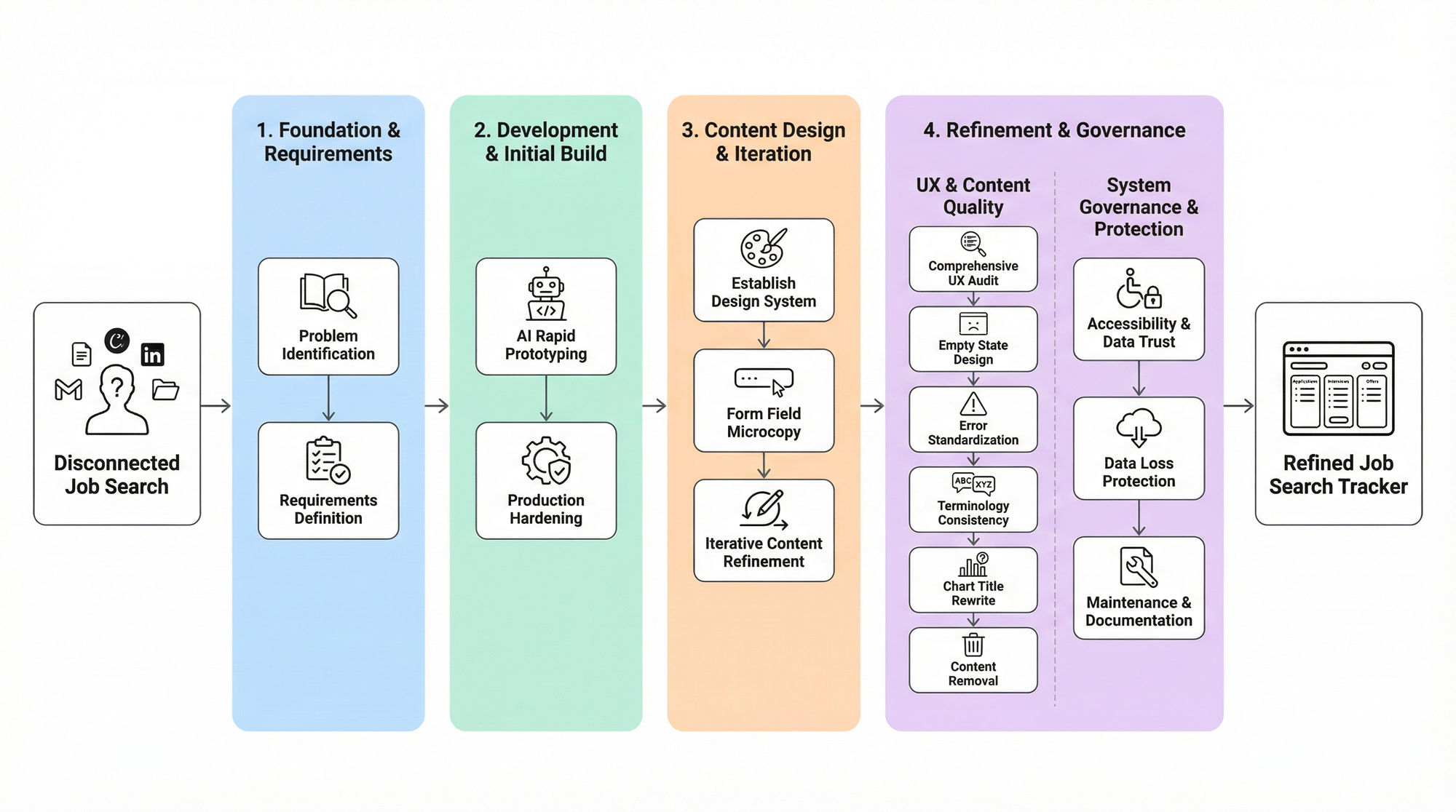
Phase 1: Rapid prototyping with Claude
I started with a simple request: "Create a job tracking system with target companies, application tracking, and localStorage persistence." Claude generated a working React application with companies and jobs tables with filtering and basic stats. It worked, but it was rough around the edges.
Phase 2: Iterative refinement
I refined the prompt to add features like one-click Careers page access, application status tracking, and backup/restore functionality. Each time, I fed Claude the existing code and asked for specific improvements.
Each iteration took minutes. Describe the problem or specific need, get a solution, test it, refine. This is AI-assisted development. You need domain expertise, but not necessarily implementation expertise.
At this point, I ran a Google Takeout export of my Drive and email correspondence. I asked Claude to parse the data for cover letters or confirmations/rejections and use the date metadata to generate an importable JSON file of my job application history.
I started using the dashboard app daily, and it was already making a difference in my job search. Hosted on my local machine, I could make tweaks in real time when a new idea struck me. (It's also when I prompted Claude to make it pretty.)
Phase 3: Production hardening with GitHub Copilot
So... success! Right? Well not quite. All the iterations had made for a pretty messy codebase. I needed to clean up, optimize, and ensure the app was robust enough for regular use.
I moved the code to VS Code and used GitHub Copilot to transform the prototype into production-ready code through multi-stage refinement:
- Code Quality Audit: "Act as a senior engineer reviewing this code. Identify code smells, duplication, and areas that violate DRY principles. Suggest refactoring strategies."
- Security Hardening: "Act as a security engineer. Review this code for XSS vulnerabilities, injection risks, and unsafe practices. Implement proper input sanitization and validation."
- Performance Optimization: "Act as a performance engineer. Identify bottlenecks, inefficient algorithms, and unnecessary re-renders. Optimize for scalability and responsiveness."
- Production Deployment: "Generate deployment scripts and configuration for hosting this as a static site on GitHub Pages. Include build optimization and error handling."
This multi-stage approach of rapid prototyping with conversational AI, then hardening with code-focused AI, transformed my modest tracker into a robust application.
What it does
Company inventory
This view is most useful for remembering which companies you should be checking for new roles to drop. In V1, I pre-loaded some companies with direct links to their job search pages. You can hide these from view if they're not useful in your search.
Click a company name to visit their careers site. Click the application count to filter your jobs view to that company. Add new companies manually or let them auto-generate when you add jobs.
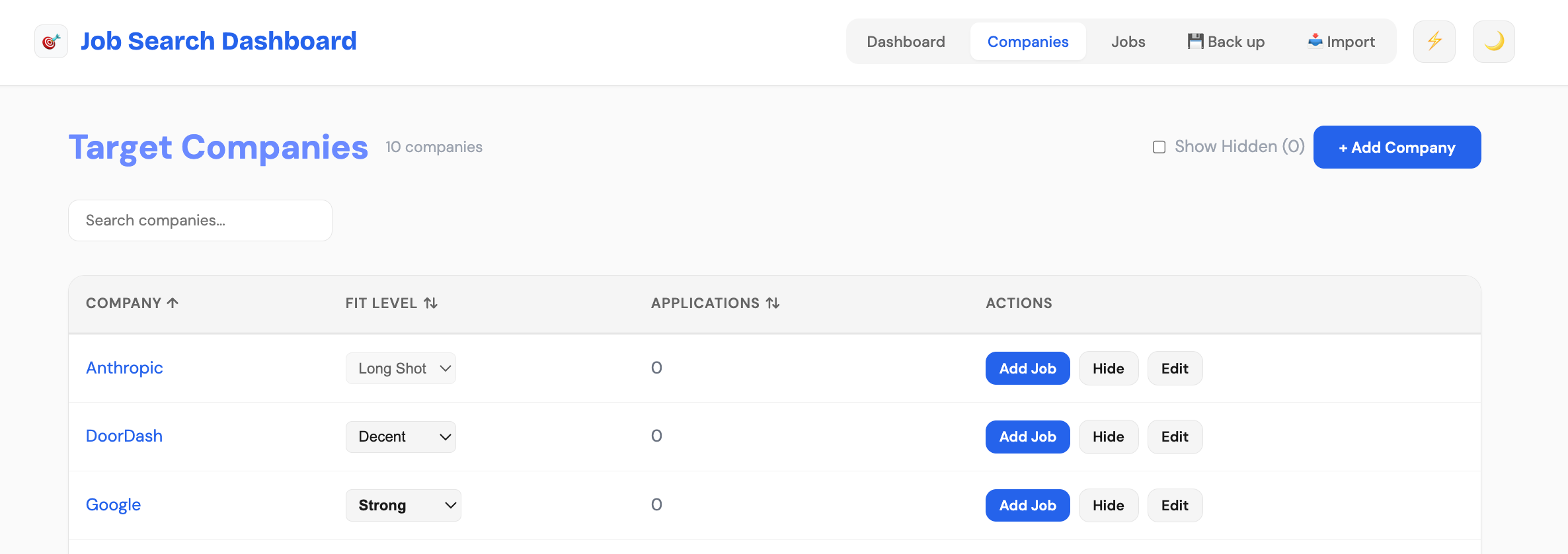
💡 Pro tip! When you've applied your preferred filters to a Careers page search, copy that URL into the tracker so that future visits take you directly to the results you need.
Application tracking (jobs)
This is the heart of the app. Here you track each job application from submission to response.
Core workflow:
- Browse Companies → Click careers link → Find role
- Add Job → Fill in company, title, date, URL fields
- Update Status and Progression as you move through the pipeline
- Close with appropriate reason and the closing date when done
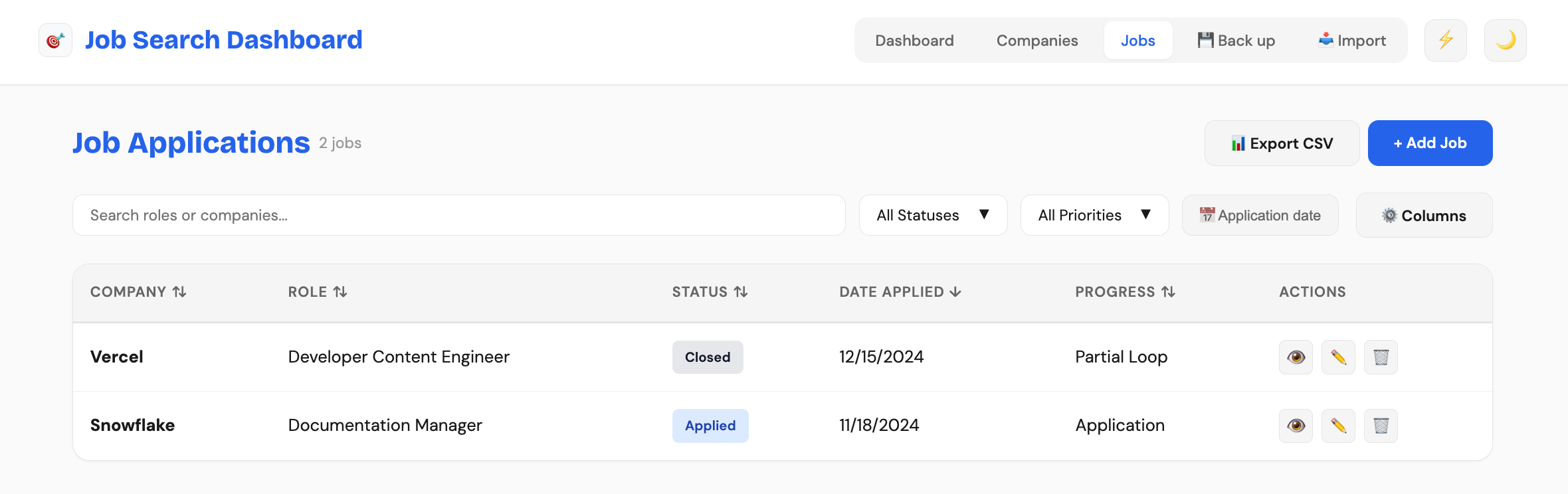
Data structure for job statuses:
- Applied: Submitted, waiting for response
- In Progress: Active conversation
- Progression: Recruiter Screen → Partial Loop → Full Loop → Offer
- Closed: This role is no longer active or you've eliminated it
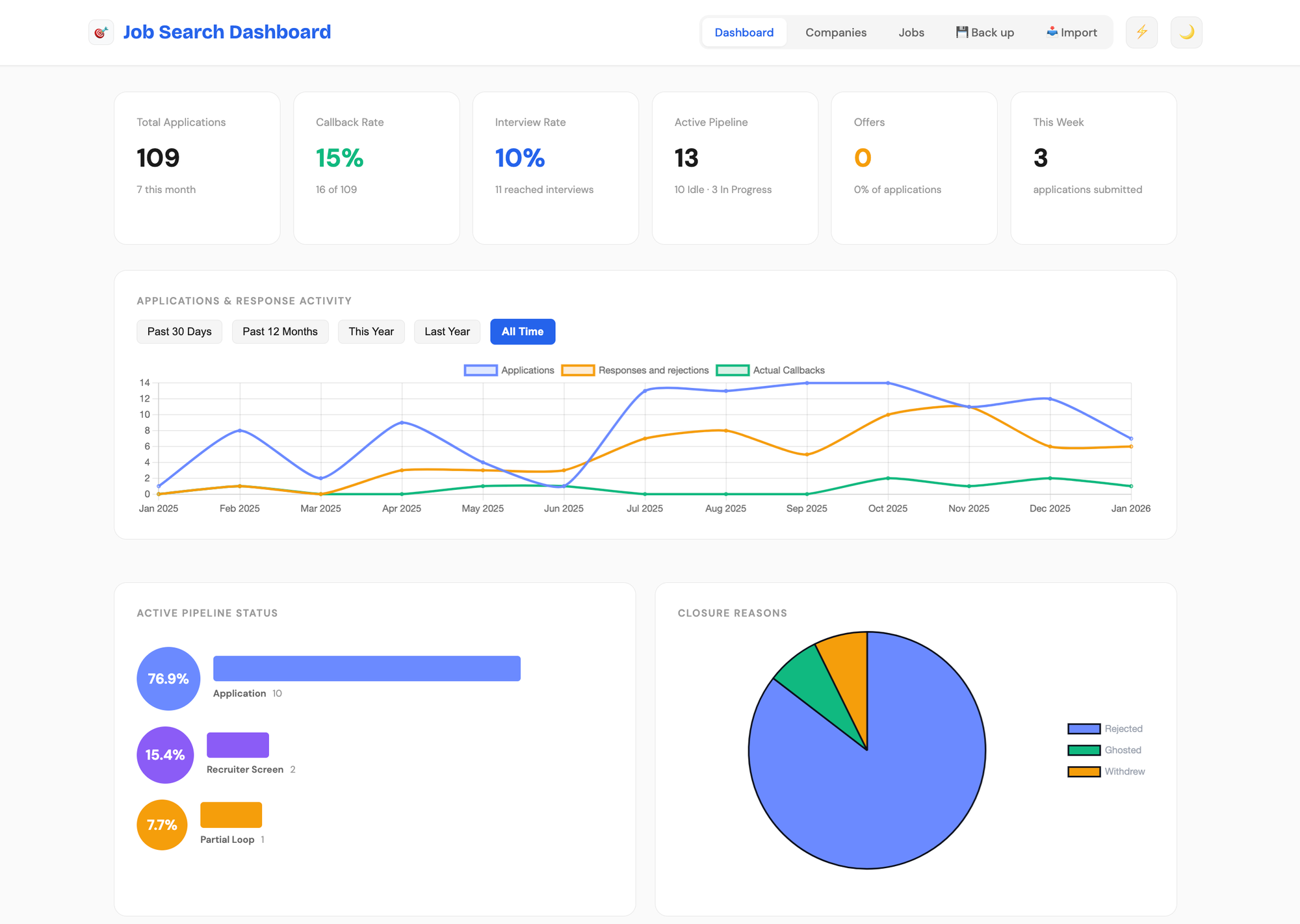
- Close Reason: Rejected, Ghosted, Withdrew, Declined Offer
With this structure, we get some useful analytics. Response rate measures jobs that moved beyond "Applied." Pipeline health shows distribution across interview stages. Closure patterns reveal whether you're getting rejected, ghosted, or withdrawing.
Data management
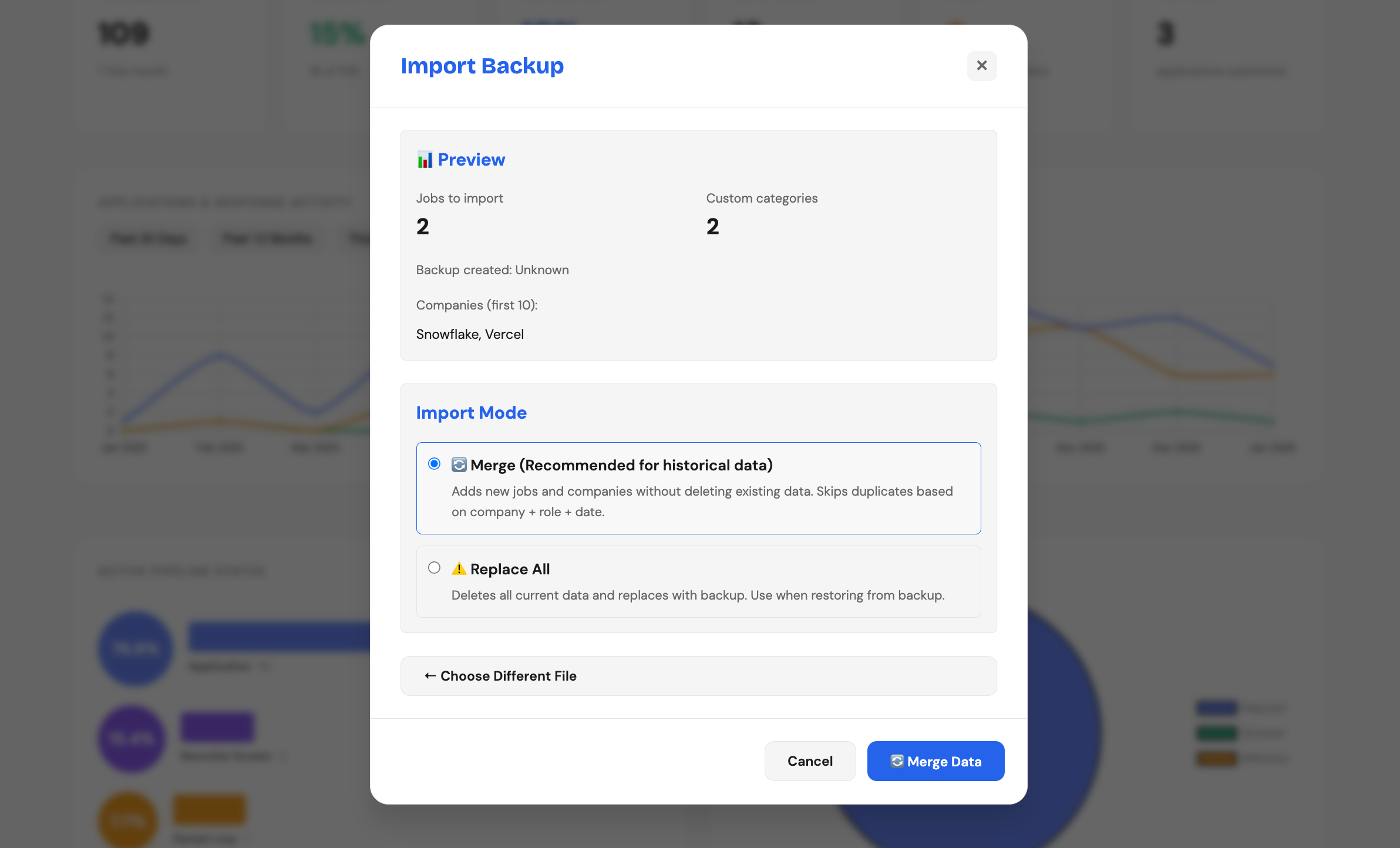
This is a critical feature: One-click JSON export for backups. The backup button turns red as a reminder to use it regularly. Since all your data is hosted locally, you don't want to risk losing it all when you clear your cache or switch browsers.
If you do blast away your data, simply import your latest backup to restore. Keep in mind that the app is intended for desktop use and you won't be able to see your inputs on another device (like your phone) pointing to the same URL.
How to use it
The dashboard is live and ready for you to use at https://jburgh.github.io/job-search-dashboard.
⚠️ Important: Data is stored in your browser's localStorage. It will disappear if you clear your cache. The Backup button at the top turns red every day or so as a reminder. Use it to export your data to an importable JSON file.
Companies Tab
I've preloaded some companies for convenience. You can hide any with the Hide button, or add your own.
- Select a company name to navigate to its career page
- Select the application count to filter your jobs view to that company
- Select "Add Company" to enter new companies manually
Jobs Tab
Select "Add Job" to log each application. When you add a job, the tracker looks for the company name and automatically relates the job to the company in the tracker. If the company isn't tracked yet, the app will create it for you. You'll want to update the company URL later, because it defaults to the job URL that you enter with the application.
As you progress:
- Set status to "In Progress" when a company reaches out (even just a recruiter screen)
- Update Progression as you move through interview stages
- Set status to "Closed" and choose a Close Reason when you get a rejection, withdraw, or are eliminated
- Set the Follow-up date to the date you got rejected or withdrew
Best Practices
- Add jobs immediately after applying (before you forget details)
- Capture contact names when recruiters reach out
- Write notes after each interaction
- Set priority tiers honestly (don't mark everything Tier 1)
- Back up daily - seriously, make this a habit
- Review analytics weekly to adjust your strategy
Why I'm sharing it
Job searching is hard enough without fighting your tools. You shouldn't need a CS degree to track applications effectively. You shouldn't have to choose between spreadsheets that are too simple and enterprise systems that are too complex or expensive.
So I built this. And now it's yours. Use it, share it, modify it.
If this helps even one person organize their search better or land a role faster, it was worth building (especially if that person is me!).
And seriously, back up your data. You'll thank me later.
Try the dashboard: https://jburgh.github.io/job-search-dashboard
Built by a job seeker, for job seekers, shared freely.
Questions or suggestions? Find me on LinkedIn or check out my portfolio.