From prompter to builder: a tech writer's guide to MCP and agentic workflows
When I started using AI for technical writing processes, I thought of myself as someone who builds with AI. Turns out I was just a very enthusiastic prompter. Building real agentic processes changed how I think about what technical writers need to learn right now.

This post is part of the Per the Docs article series. Links to the rest of the series are at the end of this piece.
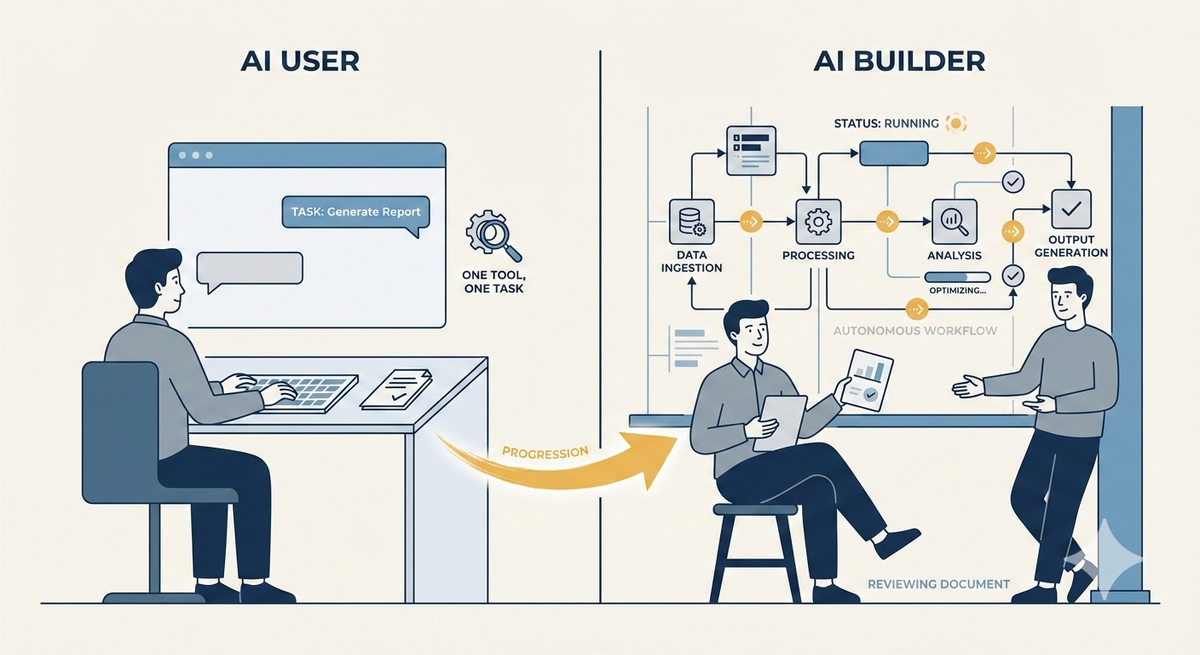
Most technical writers are using AI tools. We have Copilot, Claude, and ChatGPT in our daily workflows, helping us draft, edit, summarize, and brainstorm. But using AI tools and building AI workflows are two different things.
It's time to learn how to design systems that work without the writer in the loop. Not just how to use AI tools, but how to build workflows that make reliable decisions, retrieve the right context, and produce consistent outputs at scale. Then you'll be free to focus on strategy, stakeholder relationships, content architecture, and the judgment calls no agent can make.
When you're using AI tools within a workflow, you're the one orchestrating every step, evaluating every output, deciding what comes next. The AI waits on you between each task.
For example, you paste a support ticket into Claude and ask it to suggest a doc update. The AI handles that task and then waits for you.
In an agentic workflow, the AI orchestrates the steps itself. You give it a goal, and it plans a sequence of actions, decides which tools to call, evaluates its own outputs, and adjusts course based on what it gets back. Building agentic workflows requires you to design systems that make reliable decisions without a human at every step.
A big thing to unlearn is your assumption about stability. A document has a fixed audience and a stable context. An agentic workflow has variable inputs, multiple decision points, and behavior that shifts depending on what the model retrieves. If you're trying to treat an agentic workflow as something you can finalize, it just doesn't work that way.
How MCP changes the way we need to think
MCP lets AI models connect to external tools, data sources, and services in a structured way. With MCP, an agent can reach outside itself to query a database, read a file, call an API, or trigger an action. Instead of a model working only from what's in its context window, MCP pulls in the right information at the right moment.
For writers, this matters because documentation is a data source. Knowledge bases, style guides, API references, and release notes all become something an AI agent can retrieve, reason over, and act on. It's a fundamentally different relationship between content and AI than "paste this into ChatGPT and ask it to improve the tone." Once you understand that, you'll stop thinking about content as something you produce, but as something a system consumes.
In practice
Let's imagine we're creating a release notes generator. You need an agent to monitor a GitHub repository for merged pull requests, retrieve ticket details from Jira, cross-reference your style guide, draft release notes in the proper voice, and then route the draft to a writer via Slack.
Here's how you might build it:
GitHub Actions or n8n detects the merged PR and kicks off the workflow. n8n calls Claude, which uses MCP to pull the PR details from GitHub and ticket context from Jira. Claude drafts the release notes. n8n routes the draft to Slack.
Jot down a clear goal and define the inputs and outputs. What triggers the workflow? What does "done" look like? Keep it tight. GitHub Actions can handle the trigger logic, and tools like n8n or Make can help you map the full workflow on a visual canvas before you write out your instructions.
Next, identify the tools that the agent needs to connect to and wire them up. This is where MCP comes in. Claude with MCP servers gives you structured, reliable connections to GitHub, Jira, your docs repository, and Slack without one-off integrations.
- Get started on Claude Desktop or Claude Code. Both support MCP server configuration through a JSON config file. You add server definitions for each tool you want to connect, provide API credentials, and Claude can then interact with those tools directly.
- Connect GitHub first. GitHub has an official MCP server maintained by Anthropic. It's the most stable starting point and handles pull requests, issues, and repository operations. Test it with a real task. Ask Claude to list your open pull requests or summarize recent commits on a repo you own. If it works, you have a functioning MCP connection.
- Add Jira after GitHub is working. Jira has a couple options. The most popular community option is mcp-atlassian, which covers both Jira and Confluence and uses your Atlassian URL and API token for authentication. The official Atlassian MCP server also exists but has had some reported authentication stability issues.
- Once you've confirmed that Jira is set up, connect to Slack's official MCP server, available through the MCP servers registry.
- For your docs repository, if it's on GitHub that's already covered. If it's Confluence, mcp-atlassian handles that too.
- Finally, set up n8n or Make for automation. MCP handles the connections. n8n handles the orchestration.
Now you can write the prompt strategy, or the instructions that tell the agent how to reason across the data it retrieves from each connected tool. Prompt strategies feel like writing. Define the tone, scope, what to include, what to skip, how to handle edge cases like incomplete tickets or features that touch multiple services.
What you might not know how to do yet is handle failure at the system level. A prompt that works perfectly in isolation breaks when an agent is chaining multiple steps. Context that seems obvious to a human reader is invisible to a model that only sees what you explicitly provide. Small ambiguities compound in ways they never do in a static document.
Understand that when the agent breaks, it's because you've underspecified something. Treat prompts the way you treat documentation: validate against real conditions. Test against messy merged PRs, tickets with missing fields, and features that span multiple teams. Each break is a lesson in where your instructions are falling short.
What I had to learn
I assumed my existing skills would transfer cleanly to agentic workflows. And they partially did. The writing instincts that help me anticipate a reader's confusion translate well to designing prompts. I'm still asking: what does this system need to know, in what order, and where will it go wrong if I leave something out?
The instinct to anticipate failure modes is already there. Technical writers spend years thinking about what a user will misread, skip, or misapply. We also know how to connect systems. We've been building with APIs, webhooks, and automation tools forever.
But connecting systems for humans and designing systems for AI agents are different problems, so I had to learn to validate at the system level, not just the sentence level. I didn't fully appreciate that until I started working with MCP.
What you need to do right now
Based on my own path, a few things will make the biggest difference when you make the shift:
- Understand that an AI model can only work with what fits in its context window at one time, and that space fills up quickly when an agent is juggling multiple tools and steps.
- Get hands-on with at least one agentic tool beyond a standard chatbot interface.
- Build something small that solves a real problem.
- Document what breaks.
The writers who understand how AI systems actually work will be the ones who define how AI systems behave in production. You need to design in reliability, consistency, and usefulness from the start, then iterate as you go. It's a technical writing problem, and we're well-positioned to solve it. Now stop using and start building!
This post is part of the Per the docs article series, a monthly collaborative series where technical writers explore different aspects of our craft. Each month features a new topic with perspectives from writers across the community.
- Previous article: Shelby White - Getting started with Github
- Next article: Brandi Hopkins - Professional Development for Technical Writers: What to invest in as your career evolves
See the full list of participants and articles →
Disclaimer: Each article in this series is written and owned by its respective author. The views, opinions, and experiences shared belong solely to the individual writer and do not represent the perspectives of other participants or their employers (past or present).